# Nitrokey-App fehlerhaft
**URL:** https://support.nitrokey.com/t/nitrokey-app-fehlerhaft/1868
**Category:** Misc
**Created:** [July 22, 2019, 8:20am UTC](https://support.nitrokey.com/t/nitrokey-app-fehlerhaft/1868 "2019-07-22T08:20:15Z")
**Posts on this page:** 9
**Page:** 1
### Author:  [@fussel1955](https://support.nitrokey.com/u/fussel1955)
#### Post date: [July 22, 2019, 8:20am UTC](https://support.nitrokey.com/t/nitrokey-app-fehlerhaft/1868/1 "2019-07-22T08:20:15Z")
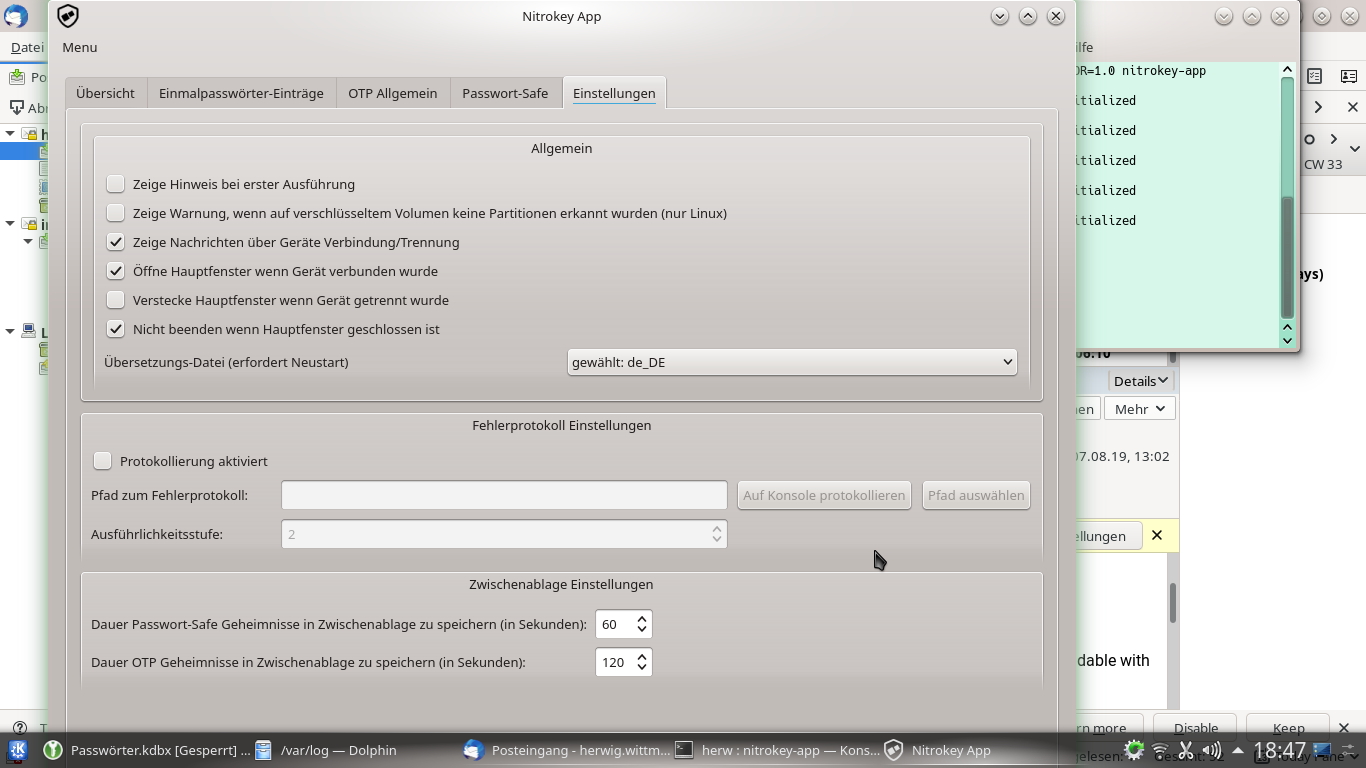
Die Nitrokey-App stürzt unter openSUSE+Plasma ab. Aber das Hauptproblem ist das Fenster, weil es einfach zu groß ist, sodass der “speichern” Button ganz unten nicht mehr zu sehen ist und sich somit der Bearbeitung entzieht. Ich habe mehrere Lösungsversuche gestartet, so z.B. Verschieben des Fensters nach oben mittels Tastaturkniff “Alt+linke Maustaste”, also Verschieben nach oben über den Bildschirmrand hinaus. Folgeproblem: Dann ist das Menü nicht mehr erreichbar. Ich muss also hin- und herschieben. Über die Fensterverwaltung/spezielle Einstellungen für dieses Programm kann man eine bestimmte Größe erzwingen, aber dann sind die Eingabefelder nicht mehr nutzbar, weil zu dünn. Folge: Die App stürzt ab.
Schließlich habe ich das Fensterthema von “Breeze” auf “Oxygen” umgestellt. Jetzt ist das Ganze zumindest sichtbarer und damit leichter zu handhaben. Aber: Eine brauchbare Lösung muss her: Das Programmfenster sollte sich mittels der üblichen Knöpfe anpassen lassen und ein senkrechter Schieberegler am Rand wäre wunderbar.
---
### Author:  [@szszszsz](https://support.nitrokey.com/u/szszszsz)
#### Post date: [July 23, 2019, 10:33am UTC](https://support.nitrokey.com/t/nitrokey-app-fehlerhaft/1868/2 "2019-07-23T10:33:38Z")
Hi!
I do not see any direct reason for such behavior of the Nitrokey App unfortunately. Could you provide please additional information, as stated below?
- Which version of Nitrokey App do you use?
- Is the problem occurs with the Nitrokey App package provided by the OS?
- Is it reproducing with latest Nitrokey App AppImage? Direct link: [https://github.com/Nitrokey/nitrokey-app/releases/download/v1.4/Nitrokey-App.AppImage](https://github.com/Nitrokey/nitrokey-app/releases/download/v1.4/Nitrokey-App.AppImage) (it suffices to download, and execute it).
- What desktop resolution do you have?
- What is the version of the openSUSE and Plasma for potential reproduction?
---
### Author:  [@fussel1955](https://support.nitrokey.com/u/fussel1955)
#### Post date: [July 23, 2019, 3:46pm UTC](https://support.nitrokey.com/t/nitrokey-app-fehlerhaft/1868/3 "2019-07-23T15:46:06Z")
Hi!
1. Nitrokey-App Version 1.32 and Firmware Version 0.10
2. Yes, Provider is: obs://build.opensuse.org/security, 1.32-1.44
3. later I will try it
4. My Desktop Resolution is 1366 x 768
Note:
```
So, because I have Tumbleweed, I think it is normal to have the
```
newest updates on my system.
---
### Author:  [@fussel1955](https://support.nitrokey.com/u/fussel1955)
#### Post date: [August 6, 2019, 12:22pm UTC](https://support.nitrokey.com/t/nitrokey-app-fehlerhaft/1868/4 "2019-08-06T12:22:51Z")
Hi szszszsz!
So, I have proof the AppImage. The result is the same: The window of the nitrokey-app is too big, so that you cannot click on the “safe” - button.
So, ich habe das AppImage wie vorgeschlagen heruntergeladen und gestartet. Das Ergebnis ist dasselbe: Das Programmfenster der nitrokey-app ist zu groß, sodass der “speichern” Knopf (ganz unten rechts) nicht betätigt werden kann.
---
### Author:  [@szszszsz](https://support.nitrokey.com/u/szszszsz)
#### Post date: [August 6, 2019, 3:01pm UTC](https://support.nitrokey.com/t/nitrokey-app-fehlerhaft/1868/5 "2019-08-06T15:01:16Z")
Hi @fussel1955 !
Thank you for checking this! Will look into it. Definitely this is a behavior I would not expect. Last question: what DPI you have set on your screen?
---
### Author:  [@szszszsz](https://support.nitrokey.com/u/szszszsz)
#### Post date: [August 7, 2019, 10:52am UTC](https://support.nitrokey.com/t/nitrokey-app-fehlerhaft/1868/6 "2019-08-07T10:52:01Z")
Hi!
I think that either you have wrong DPI set on one of the screens (or all? do you have multi-monitor setup?), or Qt cannot get/detect the right DPI.
I have found, that automatic scaling could be regulated. Could you try running the below line?
```auto
env QT_AUTO_SCREEN_SCALE_FACTOR=1 QT_SCALE_FACTOR=0.9 nitrokey-app
```
Perhaps you could experiment further, and change `0.9` to other values? On my screen the UI was cut out, and not readable with values under `1.0` though.
The variables were taken from [https://doc.qt.io/qt-5/highdpi.html](https://doc.qt.io/qt-5/highdpi.html).
Could you tell, what Qt 5 libraries version you are using?
---
### Author:  [@fussel1955](https://support.nitrokey.com/u/fussel1955)
#### Post date: [August 13, 2019, 5:33pm UTC](https://support.nitrokey.com/t/nitrokey-app-fehlerhaft/1868/7 "2019-08-13T17:33:54Z")
Hi szszszsz
```
First to the hardware: The machine is a simple acer aspire
```
notebook with ATI Mobility Radeon HD 5650 with 1 GB.
```
To your questions:
1. Wrong dpi set? I cannot set manual DPI, because it's setting
```
automatical by system.
The log says:
[28164.633] (II) RADEON(0): EDID for output HDMI-0
[28164.647] (II) RADEON(0): EDID for output VGA-0
[28164.647] (II) RADEON(0): Output LVDS connected
[28164.647] (II) RADEON(0): Output HDMI-0 disconnected
[28164.647] (II) RADEON(0): Output VGA-0 disconnected
[28164.647] (II) RADEON(0): Using exact sizes for initial
modes
[28164.647] (II) RADEON(0): Output LVDS using initial
mode 1366x768 +0+0
[28164.647] (II) RADEON(0): mem size init: gart size
:3fdde000 vram size: s:40000000 visible:80d3000
[28164.647] (==) RADEON(0): DPI set to (96, 96)
[28164.647] (==) RADEON(0): Using gamma correction (1.0,
1.0, 1.0)
```
So, DPI ist set to (96, 96)
2. To regulation of automatic scaling:
I have runnning this line:
>>env QT_AUTO_SCREEN_SCALE_FACTOR=1
```
QT\_SCALE\_FACTOR=0.9 nitrokey-app\<\<
```
So, factor 0.9 doesn't run well,because I cannot read
```
anything, but factor 1.0 is ok (bottom is still cut)
More then 1.0 ist too big.
```
3. The Version of Qt5 Libraries is 5.13.0
To see, what I mean, I have shot a screen with nitrokey-app in it.
```
Please look to the pdf.
This data file is add.
(Attachment Bildschirmfoto\_2019-08-13\_18-47-27.pdf is missing)
---
### Author:  [@fussel1955](https://support.nitrokey.com/u/fussel1955)
#### Post date: [August 13, 2019, 5:38pm UTC](https://support.nitrokey.com/t/nitrokey-app-fehlerhaft/1868/8 "2019-08-13T17:38:00Z")
Hi szszszsz
```
First to the hardware: The machine is a simple acer aspire
```
notebook with ATI Mobility Radeon HD 5650 with 1 GB.
```
To your questions:
1. Wrong dpi set? I cannot set manual DPI, because it's setting
```
automatical by system.
The log says:
[28164.633] (II) RADEON(0): EDID for output HDMI-0
[28164.647] (II) RADEON(0): EDID for output VGA-0
[28164.647] (II) RADEON(0): Output LVDS connected
[28164.647] (II) RADEON(0): Output HDMI-0 disconnected
[28164.647] (II) RADEON(0): Output VGA-0 disconnected
[28164.647] (II) RADEON(0): Using exact sizes for initial
modes
[28164.647] (II) RADEON(0): Output LVDS using initial
mode 1366x768 +0+0
[28164.647] (II) RADEON(0): mem size init: gart size
:3fdde000 vram size: s:40000000 visible:80d3000
[28164.647] (==) RADEON(0): DPI set to (96, 96)
[28164.647] (==) RADEON(0): Using gamma correction (1.0,
1.0, 1.0)
```
So, DPI ist set to (96, 96)
2. To regulation of automatic scaling:
I have runnning this line:
>>env QT_AUTO_SCREEN_SCALE_FACTOR=1
```
QT\_SCALE\_FACTOR=0.9 nitrokey-app\<\<
```
So, factor 0.9 doesn't run well,because I cannot read
```
anything, but factor 1.0 is ok (bottom is still cut)
More then 1.0 ist too big.
```
3. The Version of Qt5 Libraries is 5.13.0
To see, what I mean, I have shot a screen with nitrokey-app in it.
```
Please look to the png file.
This data file is add.
---
### Author:  [@szszszsz](https://support.nitrokey.com/u/szszszsz)
#### Post date: [August 19, 2019, 10:09am UTC](https://support.nitrokey.com/t/nitrokey-app-fehlerhaft/1868/9 "2019-08-19T10:09:37Z")
> [@fussel1955](#):
>
> - My Desktop Resolution is 1366 x 768
All right. It seems the cause is simpler than I have thought (I was sure the DPI scale issues we have encountered in the past are back). The main window form of the application has size `932x876`, which is obviously bigger than your screen. Will correct that on the next release (will need some UI redesign). Sorry for the inconvenience.
Issue registered as [NitrokeyApp#424](https://github.com/Nitrokey/nitrokey-app/issues/424).