Some time ago I activated Github two factor authentication with my NitroKey3 (which means that after entering my Github password, a browser popup appears that makes me touch the NitroKey).
After having registered a FIDO2 authentication for a microsoft account, I asked myself how to list the installed keys of the NitroKey.
I find the FIDO2 credential with this command (I have to enter the PIN that I had to define when adding the microsoft account):
nitropy fido2 list-credentials
But how to list the Github credential?
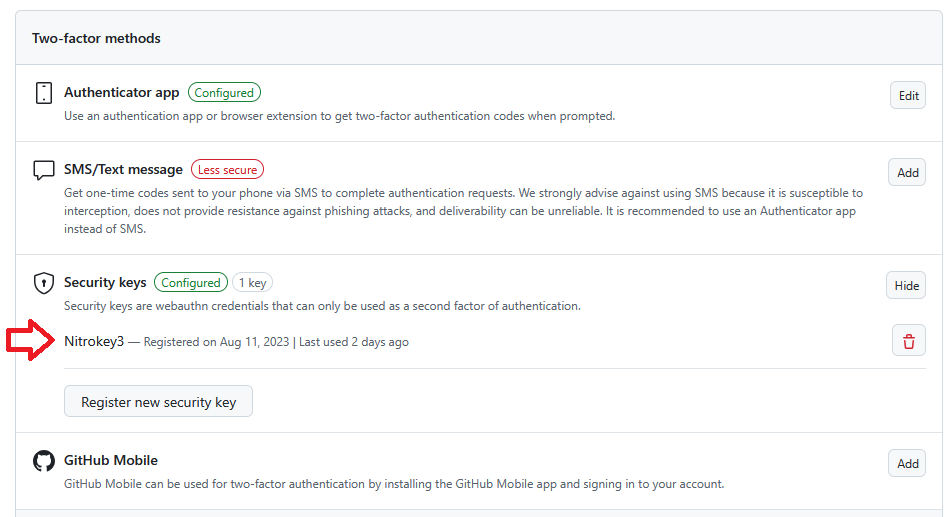
This is the github page showing where I used the NitroKey, and this seems to be doc describing the process:
If GitHub uses your Nitrokey as second factor (besides username and password), I suspect it uses a non-discoverable credential. Such a credential is not stored on your NK in the first place, and thus you cannot find it there.
That’s the reason your NK can store an unlimited number of non-discoverable credentials:
For FIDO2 depending on the other features usage, it can store up to 100 passkeys for the Nitrokey 3A Mini and up to 35 passkeys for the Nitrokey 3 NFC, also known as discoverable credentials and an unlimited number of non-discoverable credentials.
On the MDN it is stated explicitly:
The advantage of a non-discoverable credential is that the authenticator doesn’t have to store any credential-specific data, and this means it could support an essentially infinite number of credentials.
Thanks for the clarification, I already read those keywords, but couldn’t bring them together
To sum it up with my own words (and simplify it): So my Nitrokey is registered at Github, and when the browser tries to authenticate, it sends a request to the Nitrokey, which signs this request, and the server knows that this signed response is valid. But my Nitrokey does not know what request it is signing.