
Hi,
I am still relatively new to working with HSM/smart cards and have reached a point where I am stuck. I have a new HSM 2. Now I want to use it as a smart card via Mac OS codesign to sign .app files.
For testing purposes, I am using a self-signed certificate (I don’t want to generate one on the HSM only to find out that it can’t be used for that).
I was able to rule out the self-signing as the cause of the error by creating a self-signed certificate in Keychain and successfully executing the following command:
> codesign -s "KeychainTestCert" ./App.app
So code signing using self signed certificates seem to be possible.
OpenSC is installed, and Mac OS seems to be able to read the smartcard + certificates correctly:
> system_profiler SPSmartCardsDataType
SmartCards:
    Readers:
      #01: Nitrokey Nitrokey HSM (ATR:{length = 24, bytes = 0x3bde96ff8191fe1fc38031815448534d3173802140810792})
    Reader Drivers:
      #01: fr.apdu.ccid.smartcardccid:1.5.1 (/usr/libexec/SmartCardServices/drivers/ifd-ccid.bundle)
      #02: fr.apdu.ccid.smartcardccid:1.5.1 (/usr/local/libexec/SmartCardServices/drivers/ifd-ccid.bundle)

    SmartCard Drivers:
      #01: com.apple.CryptoTokenKit.pivtoken:1.0 (/System/Library/Frameworks/CryptoTokenKit.framework/PlugIns/pivtoken.appex)
      #02: org.opensc-project.mac.opensctoken.OpenSCTokenApp.OpenSCToken:1.1.1 (/Applications/Utilities/OpenSCTokenApp.app/Contents/PlugIns/OpenSCToken.appex)

    Available SmartCards (keychain):
        com.apple.setoken:

        com.apple.setoken:aks:

        org.opensc-project.mac.opensctoken.OpenSCTokenApp.OpenSCToken:DE********9:
          #01: Kind: private RSA 4096-bit, Certificate: {length = 20, bytes = 0xa4febbb1dffd256d8af43b6e9ccccdac4b0ecad3}, Usage: Sign Decrypt Unwrap
Valid from: 2025-10-01 15:59:56 +0000 to: 2035-09-29 15:59:56 +0000, SSL trust: NO, X509 trust: YES
-----BEGIN CERTIFICATE-----
…
-----END CERTIFICATE-----
          #02: Kind: private RSA 4096-bit, Certificate: {length = 20, bytes = 0x77acfa5433b090e2e7b601153eb222b920944581}, Usage: Sign Decrypt Unwrap
Valid from: 2025-10-01 13:29:20 +0000 to: 2053-02-15 13:29:20 +0000, SSL trust: NO, X509 trust: YES

-----BEGIN CERTIFICATE-----
…
-----END CERTIFICATE-----


    Available SmartCards (token):
        com.apple.setoken:
        com.apple.setoken:aks:

        org.opensc-project.mac.opensctoken.OpenSCTokenApp.OpenSCToken:DE********9:
          #01: Kind: private RSA 4096-bit, Certificate: {length = 20, bytes = 0xa4febbb1dffd256d8af43b6e9ccccdac4b0ecad3}, Usage: Sign Decrypt Unwrap
Valid from: 2025-10-01 15:59:56 +0000 to: 2035-09-29 15:59:56 +0000, SSL trust: NO, X509 trust: YES
-----BEGIN CERTIFICATE-----
…
-----END CERTIFICATE-----
          #02: Kind: private RSA 4096-bit, Certificate: {length = 20, bytes = 0x77acfa5433b090e2e7b601153eb222b920944581}, Usage: Sign Decrypt Unwrap
Valid from: 2025-10-01 13:29:20 +0000 to: 2053-02-15 13:29:20 +0000, SSL trust: NO, X509 trust: YES

-----BEGIN CERTIFICATE-----
…
-----END CERTIFICATE-----
When I try to access the certificate without further adjustments, codesign reports that it cannot find it:
> codesign -s "HSMTestCert" ./App.app
HSMTestCert: no identity found
I also tried the SHA1 hash of the cert instead of the common name.
When I export the certificate from the HSM and display its content, I see that it correctly has code signing as its usage:
> pkcs15-tool --read-certificate --id XXX > test.cer
> openssl x509 -in ./test.cer -text -noout
Certificate:
    Data:
        Version: 3 (0x2)
        Serial Number:
            …
        Signature Algorithm: sha256WithRSAEncryption
        Issuer: CN=HSMTestCert, O=XXX, C=XXX
        Validity
            Not Before: Oct  1 15:59:56 2025 GMT
            Not After : Sep 29 15:59:56 2035 GMT
        Subject: CN=HSMTestCert, O=XXX, C=XXX
        Subject Public Key Info:
            Public Key Algorithm: rsaEncryption
                Public-Key: (4096 bit)
                Modulus:
                    …
                Exponent: 65537 (0x10001)
        X509v3 extensions:
            X509v3 Basic Constraints:
                CA:FALSE
            X509v3 Key Usage:
                Digital Signature
            X509v3 Extended Key Usage:
                Code Signing
            X509v3 Subject Key Identifier:
                …
    Signature Algorithm: sha256WithRSAEncryption
    Signature Value:
        ...
If I import the test.cer certificate into the keychain and try to sign again, it also asks for the smartcard PIN, but after entering it it then aborts:
> codesign -s "HSMTestCert" ./App.app
App.app: errSecInternalComponent
Googling errSecInternalComponent I only find issues related to importing the apple dev root ca to Keychain - that’s why I tested a self signed certificate via Keychain (“KeychainTestCert” above)
I cannot see the smartcard in the keychain – but that seems to be normal. Mac OS seems to see it correctly.
Without HSM 2 plugged in:
> sudo security list-smartcards
No smartcards found
With HSM 2 plugged in:
> sudo security list-smartcards
project.mac.opensctoken.OpenSCTokenApp.OpenSCToken:DE********9
Processes seem to run correctly:
> ps -ef | grep OpenSC
  502  1136     1   0  2:07pm ??         0:04.11 /Library/OpenSC/bin/opensc-notify
  502 73636     1   0  9:05am ??         0:00.10 /Applications/Utilities/OpenSCTokenApp.app/Contents/PlugIns/OpenSCToken.appex/Contents/MacOS/OpenSCToken -AppleLanguages ("de-DE")
  502 73776 65661   0  9:07am ttys000    0:00.00 grep OpenSC
OS: macOS 15.6.1
Processor: M4 Pro
/e1: masked some things I suspect to be the serial (DE********9).
/e2 + e3: I just did some more testing and generated an development certificate via xcode.
If I use that one via Keychain, everything seems to work. After importing it in the HSM, I can also access it via pkcs#11, sign data (tested via node.js graphene-pk11) and validate the signature against the known public key.
Codesign again tells me, that it doesn’t find the identity:
codesign -s "Apple Development: ****@***.** (8********R)" MyApp.app
Apple Development: ****@***.** (8********R): no identity found
In Smart Card Shell everything looks well:
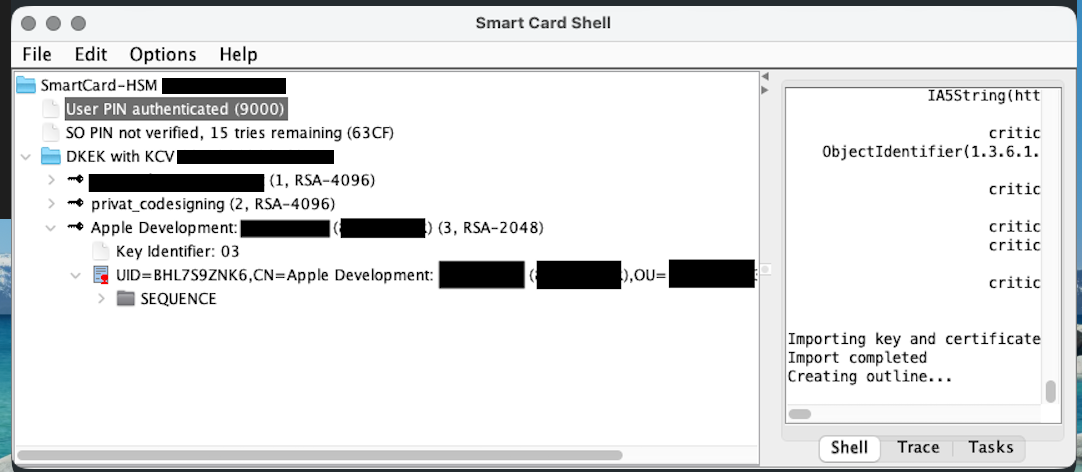
So I guess the issue is OpenSC, or OpenSC communicating with codesign or pkcs#11.
Does anyone have an idea on how to further investigate this issue?
Thank you in advance!