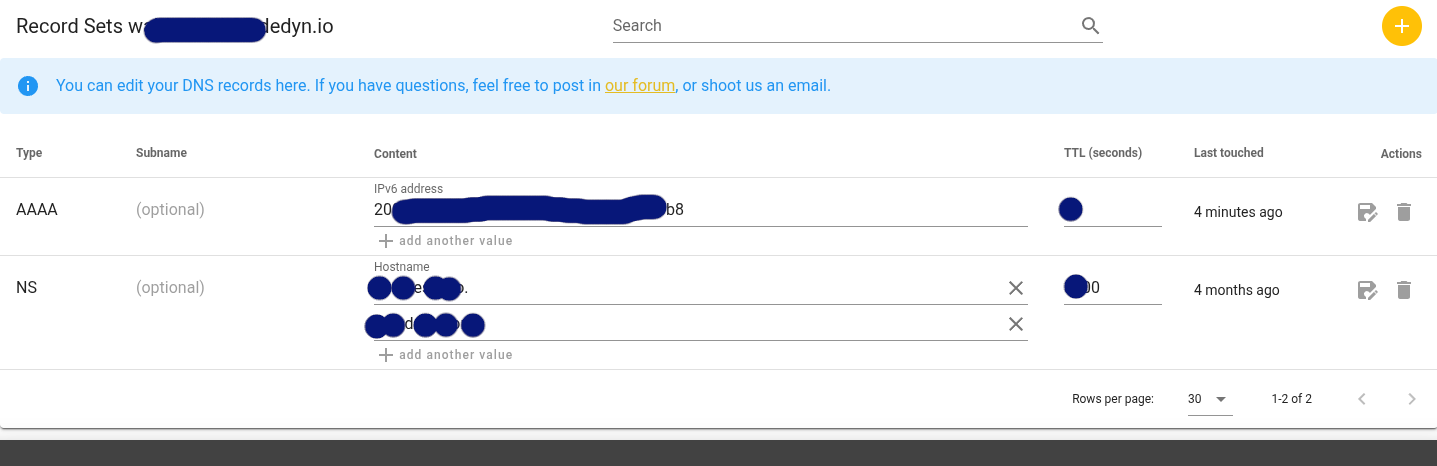
Meine NextBox ist über die externe IP erneut nicht mehr erreichbar. Powercycle und Soft Reset haben auch nach mehrmaligem Durchführen nichts gebracht. (Manchmal ging es für ganz kurze Zeit wieder.) Im Terminal per SSH ist die Box erreichbar (ob die interne IP auch im Browser ginge, weiss ich nicht, weil dort automatisch auf die externe umgestellt wird.
Auf erneuten Factory Reset habe ich wenig Lust, zumal das jeweils eine ziemliche Operation war. Deshalb: Welche Möglichkeiten habe ich, um erst mal herauszufinden, was überhaupt das Problem ist und dann um auch eine Lösung zu finden?
Schau mal ob bei desec noch dein IPv4 Eintrag verfügbar ist.
Das ist aktuell das Problem bei mir und ich habe die Frage auch schon im Desec Forum gestellt.
Powercycle und Soft Reset habe ich auch hinter mir. (vorher)
Weißt du, ob du standardmäßig über v4 oder v6 von außen zugreifst?
Ich meine standardmässig über IPv4. Mein desec Eintrag ist im Anhang. Wenn ich den richtig interpretiere fehlt der IPv4 Eintrag. Wäre das also der Fehler? Und eine Lösung gibt es (noch) nicht?
Ich hänge mich hier mal ran. Ich habe auch ein Bildschirmfoto gemacht. Auch bei mir steht nur IPv6 adress. Wenn das wirklich der Fehler ist, wäre es ja schön, wenn jemand eine Lösung hätte. Ich stehe komplett auf dem Schlauch.
I have had similar problems to many with losing external access to my nextbox
I could still connect locally through my browser on the local IP address and also through ssh
My problem was that /etc/ddclient.conf wasn’t set up correctly
This is what finally worked for me (the -4 tells it to use IPv4)
replace mydomain with your domain name and mytoken with your token
Once the NextBox tells deSEC “I have no IPv4 address,” deSEC does exactly what it’s told and wipes the A record.
Fixing /etc/ddclient.conf and putting back my IPv4 address in the A record at deSEC – Free Secure DNS solved my problems
Run this command to see if ddclient can successfully talk to deSEC:
$ sudo ddclient -daemon=0 -debug -verbose -noquiet
Look at the last few lines. It should say “SUCCESS” and give your IPv4 address
I used this command to restart
$ sudo systemctl restart nextbox-daemon
Ja, ob die v4 Adresse bei desec enthalten ist oder nicht schwankt. Ursache ist mir unbekannt.
Meinerseits hat es 4 Jahre lang funktioniert mit IPv4.
Das Config File wurde nicht angefasst.
Das ddclient File zeigt auch ein paar Fehlermeldungen, die damit wahrscheinlich nicht zusammen hängen werden. Ggf. kann sich aber jemand dazu äußern.
perl: warning: Setting locale failed.
perl: warning: Please check that your locale settings:
Language = “en_US:en”,
LC_ALL = (unset),
LANG = “en_US.UTF-8”
are supported and installed on your system.
I run $ sudo ddclient -daemon=0 -debug -verbose -noquiet
Output seems good but isn’t.
SUCCESS: mydomain.dedyn.io: skipped: IP Address was already set to “correct IPv4 Adress”
BUT in the same moment no IPv4 Adress is set in the webinterface of desec.
Führt dazu, das die aktuelle IPv4 Adresse online eingetragen wird, auch wenn diese lokal noch im Cache ist weil unverändert aber bei desec schon gelöscht wurde weil angeblich keine v4 Adresse vorhanden ist.
I have now disabled the ddclient service and set a A record to have it working.
Downloaded logs from web gui.
Had to hurry because in the meantime the A Record got deleted again.
In the Logs it is often: updated deSEC IPv4 (None)
But every once in a while (no real time difference obvious) it updates with the correct v4 Adress.
Does not help much when 5 Minutes later it will get deleted again.
In the ddclient.conf I have set the intervall to 3000 instead of 300 to prevent a delete every 5 Minutes. Restarted the nextcloud daemon afterwards.
But, it doesn’t care. Still updates every 5 Minutes with the delete.
I did try your solution, and it worked, and I thought, cool, well, for half an hour, then the IPv4 entry in desec was deleted again, and it stopped working.
I think the IPv4 address recognition is somehow broken. For me, it often fails to recognize its own IPv4 address when I display it in the Nextbox app. I’ve also heard that there seem to be configuration issues where it helps to regenerate and reinstall the authorization token in DeSec in the DD-Config.
It also seems to help if you don’t use DD-Config, meaning in the Nextbox app, use the Guided DNS instead of the Custom DNS.
Apparently, another source of trouble is using the DD-Client from the system. You should configure the DD-Config in the Nextbox app instead. And correspondingly, do not set up a DD-Client in the system yourself.
I have configured DD-Config for myself so that it only sets the IPv6 entry. The IPv4 entry is handled by my router. With this setup, I have no problems. However, it was not entirely straightforward to set up.
In my nextbox I have used the initial Guided DNS Installation.
And I didn’t have set up another DDclient. But I think the /etc/ddclient.conf file is the file that got configured initially. At least it got the token from desec in it.
I just checked the ddclient for communication with desec which is working.
But however and whatever daemon is running from the nextbox to desec does not send the v4 address.
Ich klinke mich hier ein. Komme auch nicht mehr auf die Nextbox. desec passt. ssh hatte ich nicht eingerichtet. Gibt es noch eine Möglichkeit, lokal auf die nextbox zuzugreifen, um da evtl. nach blockierenden Apps zu sehen?
As far as I know, Nitrokey has discontinuated DNS updates via ddclient and switched to an implementation within the nextbox daemon. The configuration file for this is called nextbox.conf and should be located in /srv/nextbox/.
With this in mind, I believe I have found the culprit:
Regardless of which software handles the update of the external IP address, it must first retrieve it. The Nextbox daemon does this by sending HTML requests to two web addresses: For IPv6 to “http://v6.ipv6-test.com/api/myip.php” and for IPv4 to “http://v4.ipv6-test.com/api/myip.php”.
Based on my tests, it appears that these servers are unriliable:
On my Nextbox, a “curl -6” command to the IPv6 address returns the Nextbox’s correct IPv6 address, while a ‘curl’ to the IPv4 address returns an empty response. A “curl -4” returns no response at all (it seems to get stuck during handshake and has to be manually aborted).
On my Ubuntu machine, a “curl” to the IPv4 server either returns the correct address or gets stuck too, while a ‘curl’ or “curl -6” to the IPv6 server always fails.
The fix would be for Nitrokey to change the servers used for determining the external IP adresses of the nextbox. (Or as a quick fix: we should be able to edit the /usr/lib/python3/dist-packages/nextbox_daemon/consts.py file and change the adresses, shouldn’t we?)
Just done a quick browse for information about ipv6-test.com and there are some poor reviews
Wheras test-ipv6.com gets great reviews.
Hope they haven’t just used the wrong one?
later…test-ipv6.com just shows you a web page that has the info on. Doesn’t return just the ip address like ipv6-test.com does so it couldn’t be used instead.
As a Quickfix, I changed the ipv6-test.com servers to the correponding services by deSEC (https://checkipv6.dedyn.io/ and https://checkipv4.dedyn.io/). After restarting the deamon, this fixes the problem - but it messes with the nitrokey supplied configuration / system.