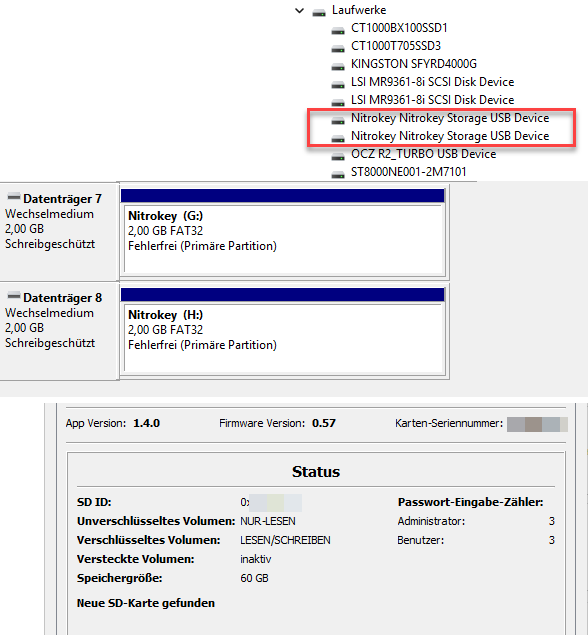
When inserted, NS2 shows up twice in the Windows Device Manager (under “Drives - NitroKey Storage USB Device”), as far as I know, it should be only one Device ….. SSDs or other USB Storage Device only show up once … !!
Checking both devices in the DriveManagement MMC really shows two separate Devices:
USBSTOR\Disk&Ven_Nitrokey&Prod_Nitrokey_Storage&Rev_1.00\9&1307297&0&0000000000000&1
USBSTOR\Disk&Ven_Nitrokey&Prod_Nitrokey_Storage&Rev_1.00\9&1307297&0&0000000000000&0
If any of the Drive Letters (G: or H:) is opened in a FileExplorer, the content of the unencrypted volume (where the app is located) will show ….. both DriveLetters open the same Drive.
Inbetween, the Nitrokey App jumps a few times between “ … connected” and “ …. disconnected”, clicking on the “About” menu in the app shows that the Key is connected, the encrypted volume can be unlocked with the user pin.
But the unlocked volume then shows up nowhere ….. Windows doesn’t recognize the “new” volume, doesn’t map it to a Drive-Letter, the volume doesn’t even show up in the DriveManagement MMC ….
Tested on two different USB ports, different Win11 computers, same result !! Not usable in this condition …..
Anyone had anything like this before, too ??
Firmware and App versions are up-to-date …..