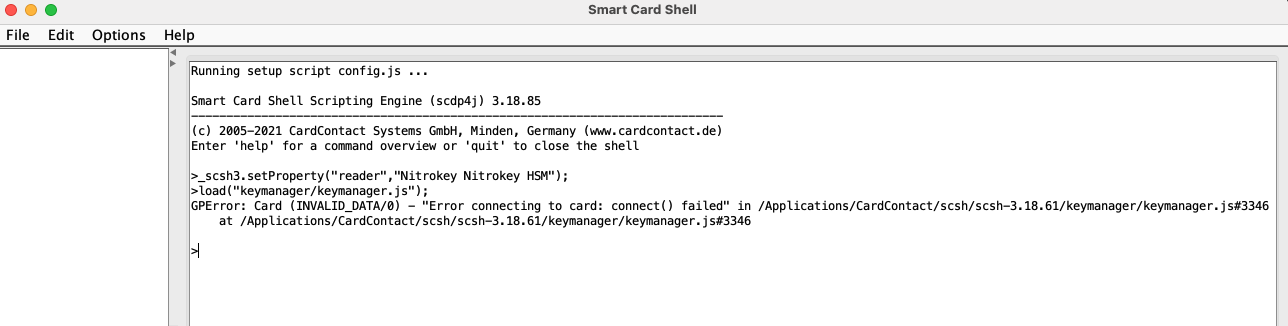
Hello:
I have been using the Nitrokey HSM 2 in Linux headless environments without issue. I want to create multiple key domains and saw that it is recommended to use the SmartCard shell to set this up.
I am currently using MacOS 15.7.1 and using JRE build 25.0.1+8-LTS-27. The Nitrokey is plugged into a Caldigit dock.
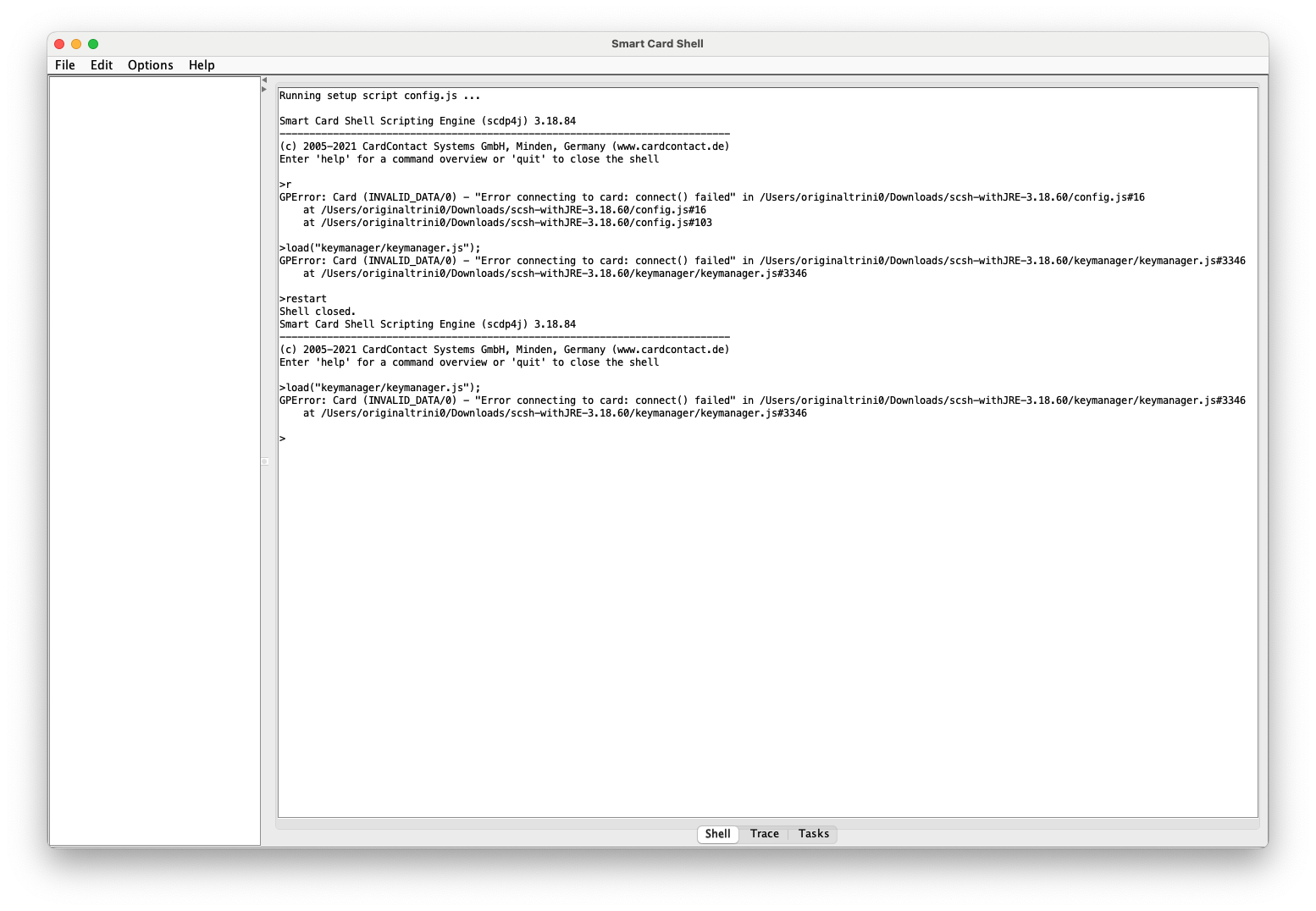
From what I can tell, SCSH does not detect the card.
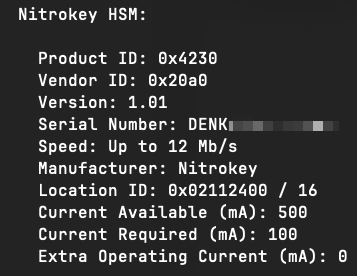
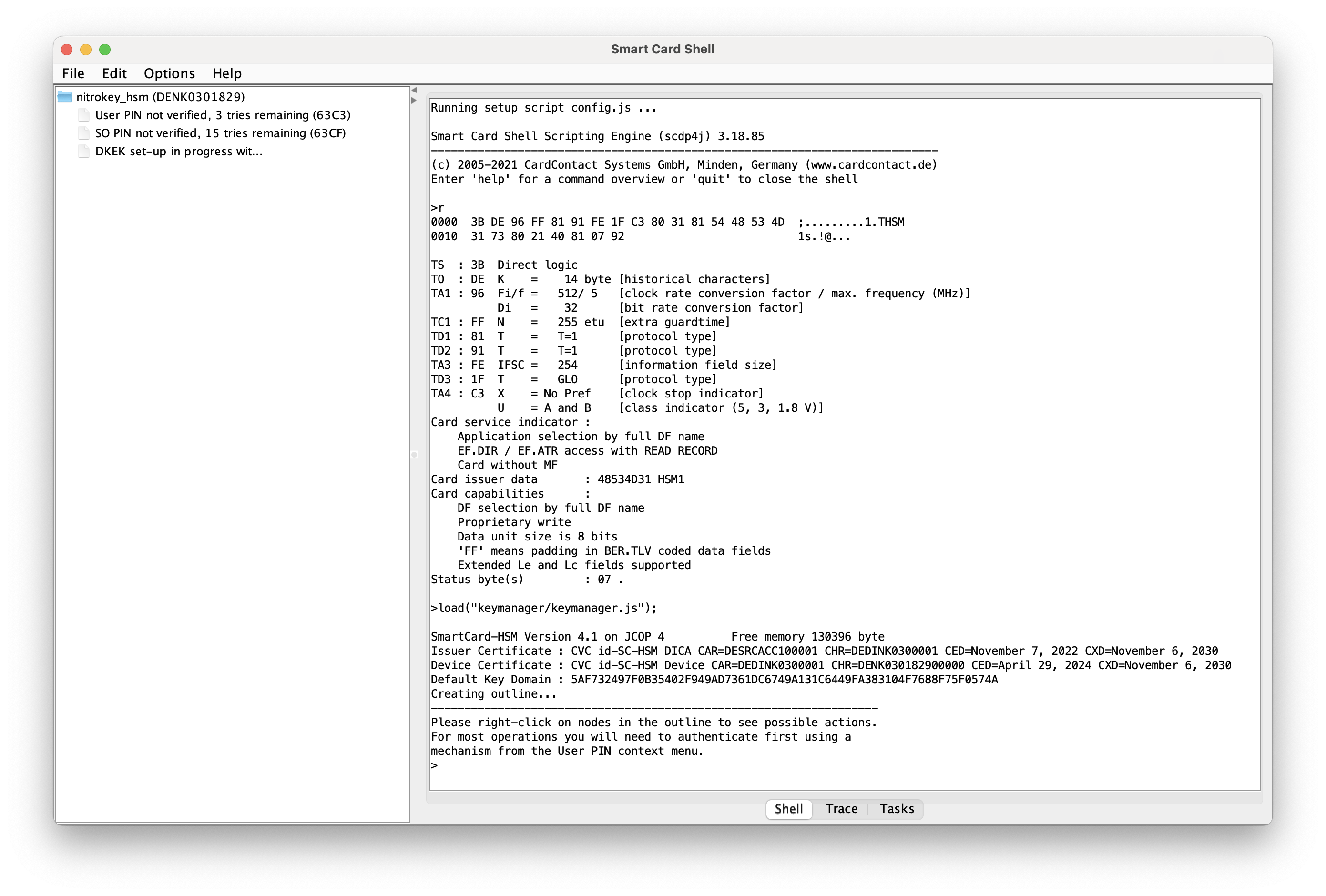
MacOS is aware of the card:
I have tried both the zip files with and without Java bundled. I also tried the command line and had a similar experience.
Has anyone come across this before, or is aware of a resolution?
Thanks
sc-hsm
January 12, 2026, 12:36pm
2
Does the token show up in Options / Reader Configuration ?
There are combinations where Java does not find the PCSC subsystem .
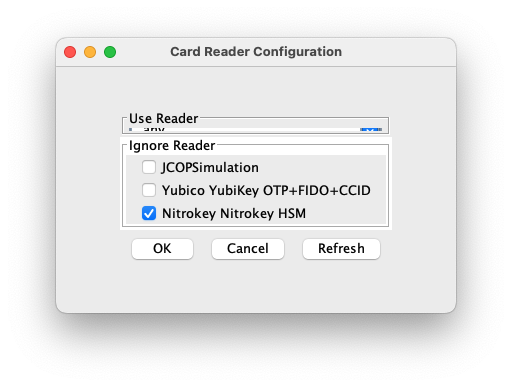
@sc-hsm Yes, the Nitrokey is listed and enabled in the card reader configuration page.
I have also tried without the YubiKey. Is the link that you provided still valid? If so, please direct me on what I should do next.
In the meantime, here are additional things that I have tried:
Removing Oracle JDK and installing OpenJDK 25.0.1
Installed pcsc-lite from Homebrew
Tried using the IzPack package
Tried running with elevated privileges
Thanks
saper
January 14, 2026, 6:36am
4
Welcome to the most confusing feature of the SmartCard Shell.
The list is titled Ignore Reader and this means do not use this card
Please try to uncheck “Nitrokey Nitrokey HSM” and see if it helps.
sc-hsm
January 14, 2026, 9:56am
5
I agree, that this is confusing. In particular if the dialog is not rendered correctly.
The PC/SC system is really made for cards. You have a card reader with a name and insert a card into it. A token is a reader with a card, but it has an unique name.
So explicitly selecting the reader name whenever you change the token is tedious. That is why the dialog has the option to disable readers you want to ignore. You basically say: “Use whatever I insert, but ignore what I have marked.”
sc-hsm
January 14, 2026, 3:44pm
6
I’ve released 3.18.61 of the Smart Card Shell to fix the layout problem.
Can you give it a try ?
@saper Shame on me for not seeing that…
@sc-hsm No joy on 3.18.61. I am still getting the same errors after deselecting my Nitrokey from the ignore reader configuration.
I am going to explore how I have things configured on my side. I am also going to see if spinning up a Linux VM on my MacBook would yield any progress.
Give me a few days, and I will report back.
Thanks
saper
January 14, 2026, 6:26pm
8
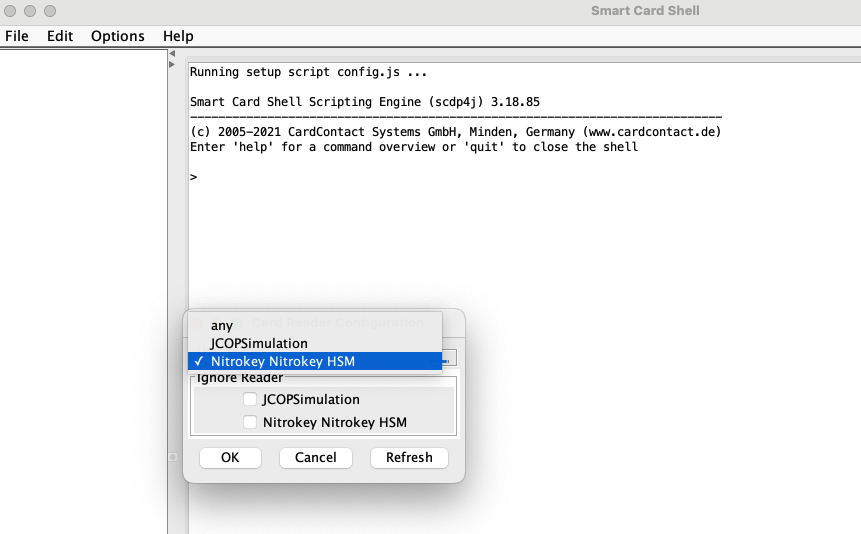
Can you select Nitrokey in the “Use Reader” and post a screenshot?
After you close the window, can you start Keymanager and post a screenshot with a problem?
Here is what it looks like under Reader Configuration:
Here is after starting Key Manager:
sc-hsm
January 15, 2026, 8:12am
10
On MacOS you don’t need to install pcsc-lite. That is already supplied as part of MacOS.
The scsh update was only meant to fix the display problem.
Did you try to access the token with sc-hsm-tool from OpenSC ?
Usually it should work out of the box on MacOS, so I’m wondering if this token has a hardware defect.
Thanks for the tip.
My goal today is to uninstall scsh and its dependencies and start over from scratch. Once everything is installed, I will test with sc-hsm-tool and report back.
Thanks
@sc-hsm Here is what I’ve done so far:
Removed SmartCard Shell IzPack, OpenSC, pcsc-lite, and oracle-jdk@25
Installed OpenSC-0.26.1.dmg, oracle-jdk@25
Download and extract scsh-withJRE-3.18.61.zip
I tested with opensc-tool and pkcs11-tool with OPENSC_DEBUG set.
# OPENSC_DEBUG=5 opensc-tool --name
P:57436; T:0x8637391424 13:24:49.085 [opensc-tool] ctx.c:753:process_config_file: Used configuration file '/Library/OpenSC/etc/opensc.conf'
P:57436; T:0x8637391424 13:24:49.085 [opensc-tool] ctx.c:981:sc_context_create: ===================================
P:57436; T:0x8637391424 13:24:49.085 [opensc-tool] ctx.c:982:sc_context_create: OpenSC version: 0.26.1
P:57436; T:0x8637391424 13:24:49.085 [opensc-tool] ctx.c:983:sc_context_create: Configured for opensc-tool (/Library/OpenSC/bin/opensc-tool)
P:57436; T:0x8637391424 13:24:49.086 [opensc-tool] ctx.c:858:sc_openssl3_init: Failed to load OpenSSL Legacy provider
P:57436; T:0x8637391424 13:24:49.086 [opensc-tool] reader-pcsc.c:890:pcsc_init: PC/SC options: connect_exclusive=0 disconnect_action=0 transaction_end_action=0 reconnect_action=0 enable_pinpad=1 enable_pace=1
P:57436; T:0x8637391424 13:24:49.087 [opensc-tool] reader-pcsc.c:1390:pcsc_detect_readers: called
P:57436; T:0x8637391424 13:24:49.087 [opensc-tool] reader-pcsc.c:1403:pcsc_detect_readers: Probing PC/SC readers
P:57436; T:0x8637391424 13:24:49.087 [opensc-tool] reader-pcsc.c:1456:pcsc_detect_readers: Establish PC/SC context
P:57436; T:0x8637391424 13:24:49.096 [opensc-tool] reader-pcsc.c:1339:pcsc_add_reader: Adding new PC/SC reader 'Nitrokey Nitrokey HSM'
P:57436; T:0x8637391424 13:24:49.096 [opensc-tool] reader-pcsc.c:364:refresh_attributes: Nitrokey Nitrokey HSM check
P:57436; T:0x8637391424 13:24:49.098 [opensc-tool] reader-pcsc.c:410:refresh_attributes: current  state: 0x00000022
P:57436; T:0x8637391424 13:24:49.098 [opensc-tool] reader-pcsc.c:411:refresh_attributes: previous state: 0x00000000
P:57436; T:0x8637391424 13:24:49.098 [opensc-tool] reader-pcsc.c:466:refresh_attributes: card present, changed
P:57436; T:0x8637391424 13:24:49.099 [opensc-tool] reader-pcsc.c:1557:pcsc_detect_readers: Nitrokey Nitrokey HSM:SCardConnect(SHARED): 0x80100066
P:57436; T:0x8637391424 13:24:49.099 [opensc-tool] reader-pcsc.c:1572:pcsc_detect_readers: returning with: 0 (Success)
P:57436; T:0x8637391424 13:24:49.099 [opensc-tool] sc.c:339:sc_detect_card_presence: called
P:57436; T:0x8637391424 13:24:49.099 [opensc-tool] reader-pcsc.c:474:pcsc_detect_card_presence: called
P:57436; T:0x8637391424 13:24:49.099 [opensc-tool] reader-pcsc.c:364:refresh_attributes: Nitrokey Nitrokey HSM check
P:57436; T:0x8637391424 13:24:49.099 [opensc-tool] reader-pcsc.c:389:refresh_attributes: returning with: 0 (Success)
P:57436; T:0x8637391424 13:24:49.099 [opensc-tool] reader-pcsc.c:482:pcsc_detect_card_presence: returning with: 1
P:57436; T:0x8637391424 13:24:49.099 [opensc-tool] sc.c:350:sc_detect_card_presence: returning with: 1
Using reader with a card: Nitrokey Nitrokey HSM
P:57436; T:0x8637391424 13:24:49.099 [opensc-tool] sc.c:339:sc_detect_card_presence: called
P:57436; T:0x8637391424 13:24:49.099 [opensc-tool] reader-pcsc.c:474:pcsc_detect_card_presence: called
P:57436; T:0x8637391424 13:24:49.099 [opensc-tool] reader-pcsc.c:364:refresh_attributes: Nitrokey Nitrokey HSM check
P:57436; T:0x8637391424 13:24:49.100 [opensc-tool] reader-pcsc.c:389:refresh_attributes: returning with: 0 (Success)
P:57436; T:0x8637391424 13:24:49.100 [opensc-tool] reader-pcsc.c:482:pcsc_detect_card_presence: returning with: 1
P:57436; T:0x8637391424 13:24:49.100 [opensc-tool] sc.c:350:sc_detect_card_presence: returning with: 1
P:57436; T:0x8637391424 13:24:49.100 [opensc-tool] card.c:254:sc_connect_card: called
P:57436; T:0x8637391424 13:24:49.100 [opensc-tool] reader-pcsc.c:613:pcsc_connect: called
P:57436; T:0x8637391424 13:24:49.100 [opensc-tool] reader-pcsc.c:364:refresh_attributes: Nitrokey Nitrokey HSM check
P:57436; T:0x8637391424 13:24:49.100 [opensc-tool] reader-pcsc.c:389:refresh_attributes: returning with: 0 (Success)
P:57436; T:0x8637391424 13:24:49.101 [opensc-tool] reader-pcsc.c:636:pcsc_connect: Nitrokey Nitrokey HSM:SCardConnect failed: 0x80100066
P:57436; T:0x8637391424 13:24:49.101 [opensc-tool] card.c:403:sc_connect_card: returning with: -1113 (Unresponsive card (correctly inserted?))
Failed to connect to card: Unresponsive card (correctly inserted?)
P:57436; T:0x8637391424 13:24:49.101 [opensc-tool] ctx.c:1066:sc_release_context: called
P:57436; T:0x8637391424 13:24:49.101 [opensc-tool] reader-pcsc.c:971:pcsc_finish: called
# OPENSC_DEBUG=5 pkcs11-tool --list-slots
P:57709; T:0x8637391424 13:27:19.447 [opensc-pkcs11] ctx.c:753:process_config_file: Used configuration file '/Library/OpenSC/etc/opensc.conf'
P:57709; T:0x8637391424 13:27:19.448 [opensc-pkcs11] ctx.c:981:sc_context_create: ===================================
P:57709; T:0x8637391424 13:27:19.448 [opensc-pkcs11] ctx.c:982:sc_context_create: OpenSC version: 0.26.1
P:57709; T:0x8637391424 13:27:19.448 [opensc-pkcs11] ctx.c:983:sc_context_create: Configured for opensc-pkcs11 (/Library/OpenSC/bin/pkcs11-tool)
P:57709; T:0x8637391424 13:27:19.448 [opensc-pkcs11] ctx.c:858:sc_openssl3_init: Failed to load OpenSSL Legacy provider
P:57709; T:0x8637391424 13:27:19.448 [opensc-pkcs11] reader-pcsc.c:890:pcsc_init: PC/SC options: connect_exclusive=0 disconnect_action=0 transaction_end_action=0 reconnect_action=0 enable_pinpad=1 enable_pace=1
P:57709; T:0x8637391424 13:27:19.449 [opensc-pkcs11] reader-pcsc.c:1390:pcsc_detect_readers: called
P:57709; T:0x8637391424 13:27:19.449 [opensc-pkcs11] reader-pcsc.c:1403:pcsc_detect_readers: Probing PC/SC readers
P:57709; T:0x8637391424 13:27:19.449 [opensc-pkcs11] reader-pcsc.c:1456:pcsc_detect_readers: Establish PC/SC context
P:57709; T:0x8637391424 13:27:19.459 [opensc-pkcs11] reader-pcsc.c:1339:pcsc_add_reader: Adding new PC/SC reader 'Nitrokey Nitrokey HSM'
P:57709; T:0x8637391424 13:27:19.459 [opensc-pkcs11] reader-pcsc.c:364:refresh_attributes: Nitrokey Nitrokey HSM check
P:57709; T:0x8637391424 13:27:19.461 [opensc-pkcs11] reader-pcsc.c:410:refresh_attributes: current  state: 0x00000022
P:57709; T:0x8637391424 13:27:19.461 [opensc-pkcs11] reader-pcsc.c:411:refresh_attributes: previous state: 0x00000000
P:57709; T:0x8637391424 13:27:19.461 [opensc-pkcs11] reader-pcsc.c:466:refresh_attributes: card present, changed
P:57709; T:0x8637391424 13:27:19.462 [opensc-pkcs11] reader-pcsc.c:1557:pcsc_detect_readers: Nitrokey Nitrokey HSM:SCardConnect(SHARED): 0x80100066
P:57709; T:0x8637391424 13:27:19.462 [opensc-pkcs11] reader-pcsc.c:1572:pcsc_detect_readers: returning with: 0 (Success)
P:57709; T:0x8637391424 13:27:19.462 [opensc-pkcs11] misc.c:545:load_pkcs11_parameters: PKCS#11 options: max_virtual_slots=16 slots_per_card=4 lock_login=0 atomic=0 pin_unblock_style=0 create_slots_flags=0x8
--snip--
P:57709; T:0x8637391424 13:27:19.462 [opensc-pkcs11] reader-pcsc.c:364:refresh_attributes: Nitrokey Nitrokey HSM check
P:57709; T:0x8637391424 13:27:19.463 [opensc-pkcs11] reader-pcsc.c:389:refresh_attributes: returning with: 0 (Success)
P:57709; T:0x8637391424 13:27:19.463 [opensc-pkcs11] reader-pcsc.c:636:pcsc_connect: Nitrokey Nitrokey HSM:SCardConnect failed: 0x80100066
P:57709; T:0x8637391424 13:27:19.463 [opensc-pkcs11] card.c:403:sc_connect_card: returning with: -1113 (Unresponsive card (correctly inserted?))
P:57709; T:0x8637391424 13:27:19.463 [opensc-pkcs11] slot.c:268:card_detect: Nitrokey Nitrokey HSM: SC connect card error -1113
P:57709; T:0x8637391424 13:27:19.463 [opensc-pkcs11] misc.c:72:sc_to_cryptoki_error_common: libopensc return value: -1113 (Unresponsive card (correctly inserted?))
--snip--
P:57709; T:0x8637391424 13:27:19.469 [opensc-pkcs11] card.c:254:sc_connect_card: called
P:57709; T:0x8637391424 13:27:19.469 [opensc-pkcs11] reader-pcsc.c:613:pcsc_connect: called
P:57709; T:0x8637391424 13:27:19.469 [opensc-pkcs11] reader-pcsc.c:364:refresh_attributes: Nitrokey Nitrokey HSM check
P:57709; T:0x8637391424 13:27:19.470 [opensc-pkcs11] reader-pcsc.c:389:refresh_attributes: returning with: 0 (Success)
P:57709; T:0x8637391424 13:27:19.471 [opensc-pkcs11] reader-pcsc.c:636:pcsc_connect: Nitrokey Nitrokey HSM:SCardConnect failed: 0x80100066
P:57709; T:0x8637391424 13:27:19.471 [opensc-pkcs11] card.c:403:sc_connect_card: returning with: -1113 (Unresponsive card (correctly inserted?))
P:57709; T:0x8637391424 13:27:19.471 [opensc-pkcs11] slot.c:268:card_detect: Nitrokey Nitrokey HSM: SC connect card error -1113
P:57709; T:0x8637391424 13:27:19.471 [opensc-pkcs11] misc.c:72:sc_to_cryptoki_error_common: libopensc return value: -1113 (Unresponsive card (correctly inserted?))
P:57709; T:0x8637391424 13:27:19.471 [opensc-pkcs11] pkcs11-global.c:651:C_GetSlotInfo: C_GetSlotInfo() card detect rv 0x30
P:57709; T:0x8637391424 13:27:19.471 [opensc-pkcs11] pkcs11-global.c:668:C_GetSlotInfo: C_GetSlotInfo() flags 0x0
P:57709; T:0x8637391424 13:27:19.471 [opensc-pkcs11] pkcs11-global.c:672:C_GetSlotInfo: C_GetSlotInfo(0x0) = CKR_DEVICE_ERROR
Slot 0 (0x0): (GetSlotInfo failed, CKR_DEVICE_ERROR)
P:57709; T:0x8637391424 13:27:19.471 [opensc-pkcs11] pkcs11-global.c:415:C_Finalize: C_Finalize()
P:57709; T:0x8637391424 13:27:19.471 [opensc-pkcs11] ctx.c:1042:sc_cancel: called
P:57709; T:0x8637391424 13:27:19.471 [opensc-pkcs11] reader-pcsc.c:784:pcsc_cancel: called
P:57709; T:0x8637391424 13:27:19.471 [opensc-pkcs11] slot.c:191:card_removed: Nitrokey Nitrokey HSM: card removed
P:57709; T:0x8637391424 13:27:19.471 [opensc-pkcs11] slot.c:501:slot_token_removed: slot_token_removed(0x0)
P:57709; T:0x8637391424 13:27:19.471 [opensc-pkcs11] pkcs11-session.c:145:sc_pkcs11_close_all_sessions: real C_CloseAllSessions(0x0) 0
P:57709; T:0x8637391424 13:27:19.471 [opensc-pkcs11] slot.c:501:slot_token_removed: slot_token_removed(0x1)
P:57709; T:0x8637391424 13:27:19.471 [opensc-pkcs11] pkcs11-session.c:145:sc_pkcs11_close_all_sessions: real C_CloseAllSessions(0x1) 0
P:57709; T:0x8637391424 13:27:19.471 [opensc-pkcs11] slot.c:501:slot_token_removed: slot_token_removed(0x2)
P:57709; T:0x8637391424 13:27:19.471 [opensc-pkcs11] pkcs11-session.c:145:sc_pkcs11_close_all_sessions: real C_CloseAllSessions(0x2) 0
P:57709; T:0x8637391424 13:27:19.471 [opensc-pkcs11] slot.c:501:slot_token_removed: slot_token_removed(0x3)
P:57709; T:0x8637391424 13:27:19.471 [opensc-pkcs11] pkcs11-session.c:145:sc_pkcs11_close_all_sessions: real C_CloseAllSessions(0x3) 0
P:57709; T:0x8637391424 13:27:19.471 [opensc-pkcs11] ctx.c:1066:sc_release_context: called
P:57709; T:0x8637391424 13:27:19.471 [opensc-pkcs11] reader-pcsc.c:971:pcsc_finish: called
I have a USB-C-to-USB-A converter on order so I can bypass my Caldigit TS4 dock and Element hub.
Not sure why it is behaving this way, since it appears to work just fine under Linux (minus the dock).
I’ll report back after testing without the dock.
Thanks
The USB converters came in, and I was getting the same errors as before. At this point, I thought it was totally broken.
I dug around some more on pcsc_connect: Nitrokey Nitrokey HSM:SCardConnect failed: 0x80100066 and came across this closed issue that were mentioning CCID drivers. I validated that the ifd-ccid.bundle drivers were in /usr/local/libexec/SmartCardServices/drivers.
Got curious about whether my drivers were “old”, and came across this page . I validated that the drivers were in a disabled state. i.e. defaults read /Library/Preferences/com.apple.security.smartcard.plist useIFDCCID == 0
Enabling the driver com.apple.security.smartcard brought things to life on my end. I was able to use cli tools without issue, and SmartCard Shell GUI is also working.
So I am ok. Now I can try figuring out the key domains piece.
Thanks everyone
sc-hsm
January 16, 2026, 8:36am
14
Thanks for posting your findings. I’m sure this will help others as well.
My guess is, that installing pcsc-lite from Homebrew changed this setting to disable the build-in CCID driver.
Did you install pcsc-lite because it didn’t work before or do we have specific instructions for this somewhere in the docs ?
On Linux we sometime see this issue with distributions that don’t install pcsc by default. For MacOS I don’t remember seeing that recommendation.
I installed pcsc-lite on a whim while troubleshooting my issue, so I’m not sure.
What is interesting is that when I initially got the HSM 2, I had trouble logging in to the PKI-as-a-service portal [link ]. Now, I can log in to it without any issues, and I do not recall messing around with pcsc back then.